
Let me guess. You have at least five tabs open right now.
One is for your work, one is a half-written email, and a couple are for that thing you meant to research an hour ago. And another tab is probably ChatGPT, where you copy and paste info back and forth.
It’s a clunky, inefficient process. It breaks your concentration and kills your productivity. What if your browser could do the heavy lifting for you?
Introducing ChatGPT Atlas: The Browser with a Brain
OpenAI just launched ChatGPT Atlas, and it’s not just another browser.
It’s a web browser built from the ground up with a powerful AI at its core. Think of it as upgrading from a simple map to a self-driving car.
This browser doesn’t just show you the web; it interacts with it alongside you.
So, How Does This Actually Make Your Life Easier?
Imagine you’re reading a complex article. Instead of highlighting text and asking ChatGPT to “explain this,” Atlas already understands the context of the page you’re on.
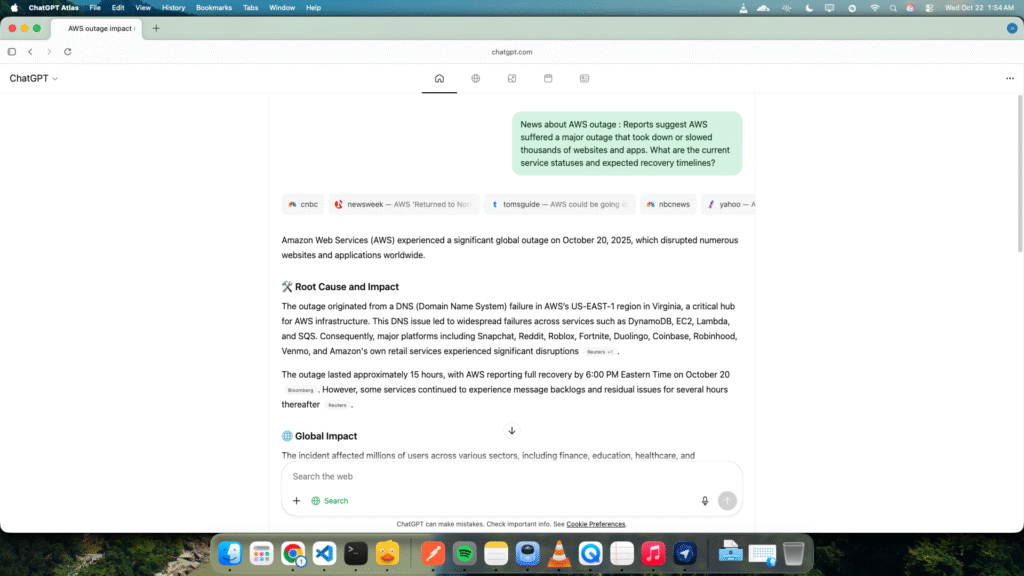
You can simply ask it questions, and it knows exactly what you’re talking about. No more copying, pasting, or switching tabs.
This creates a seamless workflow, keeping you focused on what really matters.
What’s Under the Hood? Key Features of ChatGPT Atlas
This isn’t just a gimmick. OpenAI packed some serious power into this browser.
Let’s break down the most important features.
- Contextual Awareness: Atlas sees the content on your screen, allowing it to understand what you’re doing and provide relevant help instantly.
- Built-in Memory: It can remember information across different websites (with your permission, of course) to help you connect the dots during complex research.
- Total User Control: You are 100% in charge of your data. You can easily view, manage, or delete what the browser remembers.
- Private Browsing: An incognito mode ensures your activity isn’t saved when you need complete privacy.
The Real Game-Changer: Meet Your New AI Agent
Okay, this is where things get really exciting.
ChatGPT Atlas includes a powerful AI agent that can perform tasks for you across the web. You don’t just ask it questions; you give it jobs to do.
Think about planning a dinner party. You could ask the agent to:
- Find a popular recipe online.
- Create a shopping list based on that recipe.
- Add all the items to an online cart at your favorite grocery store, like Instacart.
- Schedule it for delivery.
This is the future of productivity—delegating tedious, multi-step tasks to your browser.
Why You Should Switch to ChatGPT Atlas Today
You might be comfortable with your current browser. I get it. Change is hard.
But the benefits here are too big to ignore.
Using ChatGPT Atlas is about more than just convenience. It’s about reclaiming your time and mental energy. It’s designed to:
- Save you hours every week by automating routine online tasks.
- Boost your creativity by handling the boring research for you.
- Keep you in a state of flow by removing digital friction.
How to Get Started in Under 2 Minutes
Ready to give it a spin? It’s incredibly simple.
The browser is currently available for macOS, with versions for Windows, iOS, and Android on the way. You can download it directly from the OpenAI website.
Once installed, it gives you a one-click option to import all your bookmarks, passwords, and history from your old browser. The entire setup is seamless.
So, the only question left is: are you ready to stop just browsing the web and start commanding it?
Tell us in the comments: Are you picking Atlas over Chrome?